
How to Apply for Your
Amtrak/Pay to Park Permit
Ready to secure your parking? Follow these steps to apply for your Amtrak/Pay to Park permit online:
1. Create Your Account or Sign In
Go to parkflag.cmrpay.com customer portal
-
New users: Sign up for an account
-
Existing users: Simply sign in with your credentials.
2. Start a New Permit Application
Once you're on the dashboard:
-
From the dropdown menu, select "Amtrak / Pay to Park."
-
Click the "Start New Permit Application" button.
-
Define your permit cycle: Choose your desired parking duration, up to a maximum of 14 days, and then select your specific start date.
3. Provide Vehicle and Permit Holder Information
-
Vehicle Details: Accurately enter all required information for your vehicle, including your license plate number, make, and model.
-
Permit Holder Details: Complete all necessary information for the primary permit holder.
4. Review, Agree, and Pay
-
Carefully read and agree to the terms and conditions for the permit.
-
Add the permit to your cart.
-
Proceed to checkout and submit your payment to finalize your application.

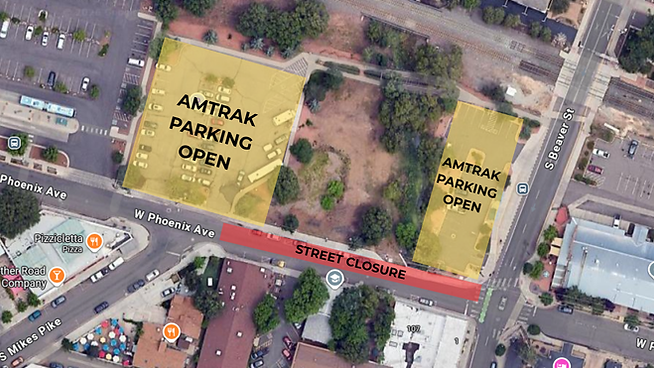
Construction Closure on Phoenix Ave
Phoenix Ave is temporarily closed for construction between Beaver Street and Mikes Pike. To access the Amtrak and Pay to Park lot on Phoenix Ave, turn onto Phoenix Ave from Milton Rd or drive north on Mikes Pike.
📍Find Amtrak Parking on Your Favorite Map App
Easily navigate to our location using any of the following services:
Still Have Questions About Amtrack Permits?
Navigating parking permits can sometimes be complex, and we're here to help!
For detailed information on all Parking Permits, we encourage you to:
-
Visit our comprehensive FAQ page
-
Find answers to common questions about eligibility, application processes, permit types, and more.
-
-
Contact the ParkFlag office directly: Our team is ready to assist you with personalized guidance and solutions for your specific parking needs.
Photos courtesy of Flagstaff Downtown Business Alliance